Loading
Loading
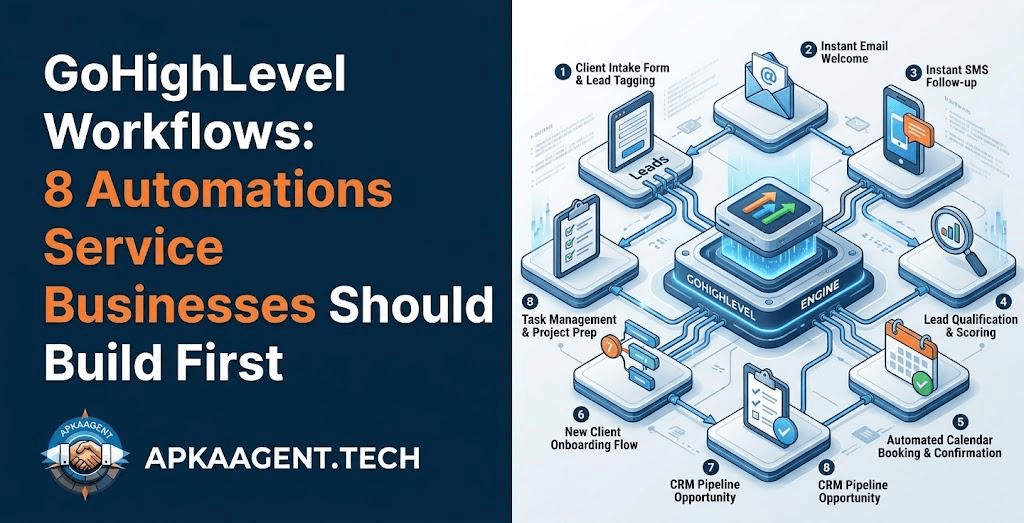
GoHighLevel gives you a lot of tools at once: a CRM, calendars, pipelines, SMS, email, forms, funnels, and reputation management. That breadth is the reason many service businesses and agencies choose it. It's also the reason many accounts end up half set up, with a few disconnected automations that nobody fully trusts.
The fix isn't to build more automations. It's to build the right few first, in the right order, so that every lead and customer moves through a predictable path. This guide covers the eight GoHighLevel workflows that matter most for a typical service business, along with the setup mistakes that cause most problems.
A GoHighLevel workflow is an automation that starts when a specific event happens to a contact and then runs a sequence of actions. Every workflow is built from four parts:
GoHighLevel includes prebuilt recipes for common scenarios. GHL workflow templates are a useful starting point, but they almost always need editing to match your services, hours, tone, and pipeline stages.
Workflows depend on clean structure. Before building anything, confirm three things in your GoHighLevel CRM:
Trigger: Form submitted, survey submitted, or new contact from an ad integration.
Actions: Send an immediate SMS and email confirming receipt, create an opportunity in the New Lead stage, assign the right team member, and send them an internal notification.
This is the workflow with the most direct effect on revenue, because people who reach out are usually contacting more than one business. A fast, personal-sounding reply helps you start the conversation before a competitor does.
Trigger: Inbound call with a missed or unanswered status.
Actions: Send an SMS within moments, such as "Sorry we missed your call. This is Dana at Brightline Plumbing. How can we help?"
For businesses where owners or technicians can't always answer the phone, this workflow turns missed calls into text conversations instead of lost leads. We cover this workflow in full, with message examples and compliance basics, in our guide to missed call text back.
Trigger: Appointment booked on a GoHighLevel calendar.
Actions: Send a confirmation immediately, a reminder the day before, and another shortly before the appointment. Move the opportunity to Appointment Booked.
Appointment reminder automation is simple to build and helps reduce no-shows. Include the address, what to prepare, and an easy way to reschedule. Making rescheduling easy is better than having someone simply not show up.
Trigger: Appointment status changed to No Show.
Actions: Send a friendly message offering a new time, wait, then create a task for a team member to call if there's no reply.
Trigger: Opportunity moved to Quote Sent.
Actions: Wait two days, check whether the stage has changed, and if not, send a short check-in. After another wait, create a call task for the salesperson.
The if/else check is important. Without it, a customer who already accepted the quote may still receive "just following up" messages.
Trigger: Opportunity moved to Won, or a "job-complete" tag added.
Actions: Wait until after the service is delivered, then send a thank-you message with a link to leave a review.
Review request automation works best when it's timed to the moment the customer feels the value, such as the evening after a repair, rather than the moment a payment clears. Follow the review platform's policies and avoid offering incentives for reviews.
Trigger: Opportunity moved to Lost with a reason such as "timing" or "budget."
Actions: Wait several weeks or months, then send a relevant check-in or seasonal offer.
Not every lost lead is gone for good. Someone who said "not this year" is worth contacting next year, as long as they haven't opted out.
Trigger: Opportunity sitting in a stage too long, or a new inbound message with no reply.
Actions: Notify the assigned user, and escalate to a manager if the item stays untouched.
This workflow protects all the others. Automation can start conversations, but people still need to close them.
No stop conditions. If someone replies or books, they should exit the follow-up sequence. Use the workflow settings and goal events so contacts stop receiving messages once they've taken the desired action.
Workflow loops. A workflow that adds a tag that triggers another workflow that removes and re-adds the tag can create repeated messages. Map your triggers before building.
Too many messages. Several automated texts in a day feel like spam. Review the combined message volume a single contact could receive across all workflows.
Testing on real customers. Create a test contact with your own phone number and email, and run every workflow end to end before turning it on.
Ignoring quiet hours. Respect reasonable sending windows in the contact's time zone. Late-night automated texts damage trust.
Once the core workflows are stable, AI can make them more responsive. GoHighLevel Conversation AI can reply to inbound messages, answer common questions, and help book appointments based on instructions and information you provide. It works best for predictable questions such as hours, service areas, and booking.
For logic beyond native features, GoHighLevel workflows can send data through webhooks to external AI agents and receive results back. Examples include classifying the intent of a long message, summarizing a conversation history before a sales call, or qualifying leads against detailed criteria. These connections require careful design so that the AI writes back clean data and doesn't send unapproved messages.
We explain the bigger picture of combining AI with CRM data, including where human review matters, in our guide to what AI automation actually changes in a business.
Many business owners can build the first few workflows themselves using templates. Outside help is worth considering when you have several services with different pipelines, when GoHighLevel needs to sync with other tools such as accounting, scheduling, or a custom website, or when you want AI agents that go beyond built-in features.
ApkaAgent sets up GoHighLevel CRM automation, connects it to other business systems, and builds custom AI agents through our CRM automation service. If your business needs a custom portal or booking experience connected to GoHighLevel, our web application development team can build it. You can see the full range of what we offer on our services page.
Good GoHighLevel automation is less about the number of workflows and more about whether every lead follows a clear, tested path. Build speed-to-lead, missed call text back, reminders, follow-ups, and review requests first. Add stop conditions, test everything with a dummy contact, and add AI only after the foundation works.
If your GoHighLevel account has grown messy or you want a clean build from the start, talk to ApkaAgent about your setup.
GoHighLevel originally offered campaigns for simple message sequences, while workflows provide triggers, conditions, branching, and a much wider range of actions. HighLevel has focused development on workflows, and they are generally the recommended way to build automations today. If you have old campaigns running, consider rebuilding them as workflows for easier management.
There's no ideal number. Most service businesses can cover the essentials with roughly six to ten well-built workflows: new lead response, missed call text back, appointment reminders, no-show recovery, quote follow-up, review requests, and internal alerts. Fewer reliable workflows are better than dozens of overlapping ones that send duplicate messages.
For business texting to US numbers through standard 10-digit phone numbers, A2P 10DLC registration is generally required by carriers. Without it, messages may be filtered or blocked. Registration involves submitting your business details and describing your messaging use case. Complete it before relying on SMS workflows, and keep message content consistent with what you registered.
Yes. GoHighLevel includes native AI features such as Conversation AI for replying to inbound messages and helping with bookings. Workflows can also connect to external AI tools through webhooks for custom tasks like lead classification or conversation summaries. External AI connections need careful setup so responses stay accurate and data is written back correctly.
Use if/else conditions that check whether a contact has booked or replied before each follow-up message, and configure workflow settings or goal events that remove contacts once they complete the desired action. Always test with a dummy contact to confirm that contacts exit sequences correctly before the workflow goes live.
We'll build the eight workflows that matter first, add the stop conditions and compliance basics, and connect AI where it earns its keep.
Talk to Us