Loading
Loading
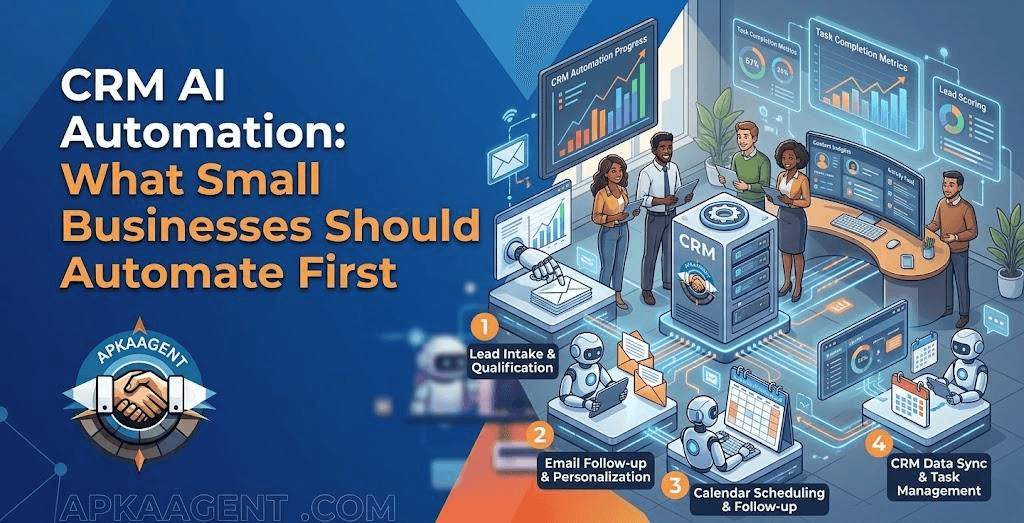
Most small businesses don't have a CRM problem. They have a CRM upkeep problem. The software is paid for, the pipeline stages are set up, and yet half the contacts have missing phone numbers, deals sit in the wrong stage for weeks, and call notes live in someone's head. The CRM was supposed to be the single source of truth, but nobody has time to keep it true.
CRM AI automation targets that upkeep. It takes over the typing, sorting, summarizing, and reminding that sales and operations teams skip when they're busy, so the CRM reflects what is actually happening in the business.
CRM AI automation is the use of artificial intelligence, usually large language models connected through workflows or AI agents, to read, write, and act on data inside a customer relationship management system. It extends traditional CRM workflow automation, which follows fixed if-this-then-that rules, by handling unstructured information such as emails, call transcripts, chat messages, and free-text form answers.
In plain terms, traditional automation can send a reminder when a deal has been in a stage for seven days. AI can read the last email thread on that deal and tell the salesperson the customer is waiting on a revised quote.
| Task | Rule-based workflow | AI-powered automation |
|---|---|---|
| Send a follow-up after a form fill | Sends the same template to everyone | Drafts a reply based on what the person actually wrote |
| Log a sales call | Creates an empty activity record | Writes a summary with next steps from the transcript |
| Tag incoming messages | Matches keywords | Understands intent even with unusual wording |
| Update contact fields | Copies structured form fields | Extracts details from emails and conversations |
| Flag stalled deals | Based on time in stage | Based on time plus conversation content |
The two approaches work best together. Rules handle predictable triggers and timing. AI handles the parts that require reading and interpretation.
When a prospect emails "We're a 12-person dental office in Phoenix looking to start in January," an AI step can extract the company size, industry, location, and timeline and write them into the right CRM fields. Sales reps stop retyping information, and reports become more reliable because fields are actually filled in.
If your phone system or meeting tool produces transcripts, AI can turn a 30-minute call into a short summary, a list of objections, and agreed next steps, then attach it to the contact record. The next person who talks to that customer starts with context instead of guesswork.
Not every inbound message is a sales lead. AI can classify messages as new inquiries, existing customer questions, billing issues, vendor pitches, or spam, then route each to the right pipeline or team member. This is one of the simplest ways to make an AI CRM integration pay off quickly.
AI can draft a follow-up email or text based on the deal history, and the salesperson edits and sends it. Keeping a human in the approval step is usually wiser than fully automatic sending, especially for high-value deals.
Duplicates multiply when leads come from several sources. AI can compare records that don't match exactly, such as "Mike Johnson, Johnson Roofing" and "Michael J., johnsonroofingaz," and suggest merges. A person should still approve merges, because a wrong merge can be harder to undo than a duplicate.
Sales pipeline automation traditionally moves deals between stages when specific events happen, such as a booked appointment or a signed proposal. AI adds a review layer: a weekly digest that highlights deals with unanswered questions, missed promises, or signs that a buyer has gone quiet.
Bad data in, confident errors out. AI will happily summarize outdated notes or extract the wrong date from a confusing email. Build in validation, such as only writing to fields when confidence is high and flagging the rest for review.
Over-automated outreach. Fully automated AI messages sent at scale can damage your reputation and create compliance problems. Texting and calling US consumers is regulated, including under the Telephone Consumer Protection Act, and business texting through 10-digit numbers generally requires A2P 10DLC registration. Get consent and messaging rules right before scaling outreach.
Privacy and access. Every AI step that reads CRM data sends that data to a model provider. Decide which fields AI can access, and avoid sending sensitive information it doesn't need.
No owner. Automations break quietly when someone renames a field or changes a pipeline stage. Every workflow needs a named owner who checks it regularly.
For a broader view of where automation helps and where people should stay involved, see our article on what AI automation actually changes in a business.
The cost of CRM automation for small business projects depends mostly on which CRM you use and how open its integrations are, how many other tools need to connect, such as phone systems, calendars, and email, and how many AI steps run each day. AI model providers typically charge based on usage, so a summary on every call costs more each month than a weekly pipeline digest. Ongoing maintenance also matters, because CRM fields, pipelines, and connected apps change over time.
A useful benchmark is the time your team currently spends on manual CRM work each week. If the honest answer is "not much, because nobody does it," the cost to consider is the deals lost to poor follow-up.
Many CRMs, including GoHighLevel and HubSpot, now include native AI features. These are a sensible first step for standard tasks inside one platform. A custom build makes more sense when data lives across several systems, when you need specific extraction or routing logic, or when you want full control over prompts, data access, and review steps.
ApkaAgent builds CRM automations and AI agents that connect to the tools you already use. Our CRM automation service covers workflow automation, integration setup, analytics, and maintenance. If you need help deciding what to automate first, our AI consulting service includes technology assessment and implementation roadmaps. You can also browse our recent projects.
An AI-powered CRM isn't about adding more features. It's about keeping the system accurate without asking busy people to do more typing. Start with one task that wastes time every day, keep a person in the review loop until accuracy is proven, and expand from there.
If your CRM has become a place where data goes to sit, schedule a free consultation with ApkaAgent and we'll look at which workflows to automate first.
CRM automation follows fixed rules, such as sending an email when a form is submitted or moving a deal when an appointment is booked. CRM AI automation adds the ability to read and interpret unstructured information like emails, call transcripts, and chat messages. It can summarize, classify, extract details, and draft replies, which rule-based workflows cannot do.
Most modern CRMs support AI automation in some form, either through built-in AI features or through APIs and webhooks that connect to external AI tools. GoHighLevel, HubSpot, Salesforce, Zoho, and Pipedrive all offer ways to connect workflows. The depth of what you can automate depends on each platform's API access and plan level.
It can be, with clear limits. Give AI steps access only to the fields they need, review how your AI provider handles and retains data, and avoid sending sensitive personal information unnecessarily. Businesses in healthcare, finance, or other regulated industries should confirm compliance requirements with qualified advisors before connecting customer records to AI tools.
Yes, if your phone or meeting system produces call recordings or transcripts. An AI step can read the transcript, write a summary, list next steps, and update relevant fields on the contact or deal record. Many teams start with summaries that a salesperson reviews, then automate field updates once accuracy is consistent.
Not always. If you have low lead volume and one person who keeps the CRM updated, simple rule-based workflows may be enough. AI becomes worthwhile when manual data entry is being skipped, when inbound messages need sorting, or when follow-ups are missed because nobody has time to read through conversation history.
We'll look at which CRM workflows to automate first, set up the review steps that keep AI accurate, and connect it to the tools you already use.
Talk to Us