Loading
Loading
Quick answer: Agentic AI is AI that can plan and complete a multi-step task on its own, using your tools and data, instead of only replying to a prompt. For small businesses, it means handing off whole workflows such as lead follow-up, invoice chasing or appointment scheduling, with a person reviewing the exceptions.
In 2024, most owners used AI to write emails. In 2025, they used it to brainstorm. This year the conversation in the US has moved from chatting to doing. The term you keep hearing for that shift is "agentic AI."
The idea sounds big, but the practical version is simple. You stop asking AI to help with a task and start letting it carry the task from start to finish, inside clear rules. This post explains what that looks like, gives seven workflows that suit small businesses, and shows a safe way to start.
Agentic AI refers to AI systems that can take a goal, break it into steps, use software tools to carry out those steps, check the result, and adjust if something goes wrong. A normal chatbot waits for your next message. An agentic system keeps working until the job is done or it needs a human decision.
If you want the fundamentals first, start with our explainer, What Is an AI Agent?
Regular automation follows fixed if-this-then-that rules and breaks when something unexpected happens. Agentic AI can read unstructured information such as emails, PDFs or call transcripts, make a judgment within limits you set, and pick the next step. The two work best together.
| Factor | Rule-based automation | Agentic AI |
|---|---|---|
| Input | Clean, structured data | Messy text, emails, documents, voice |
| Decisions | Fixed rules only | Judgment within set limits |
| When things change | Breaks or skips | Adapts or asks a human |
| Best use | Moving data between apps | Tasks that need reading and deciding |
Tools like n8n, Zapier and Make often provide the plumbing underneath an agent. Our comparison of n8n vs Zapier vs Make helps you pick the right base.
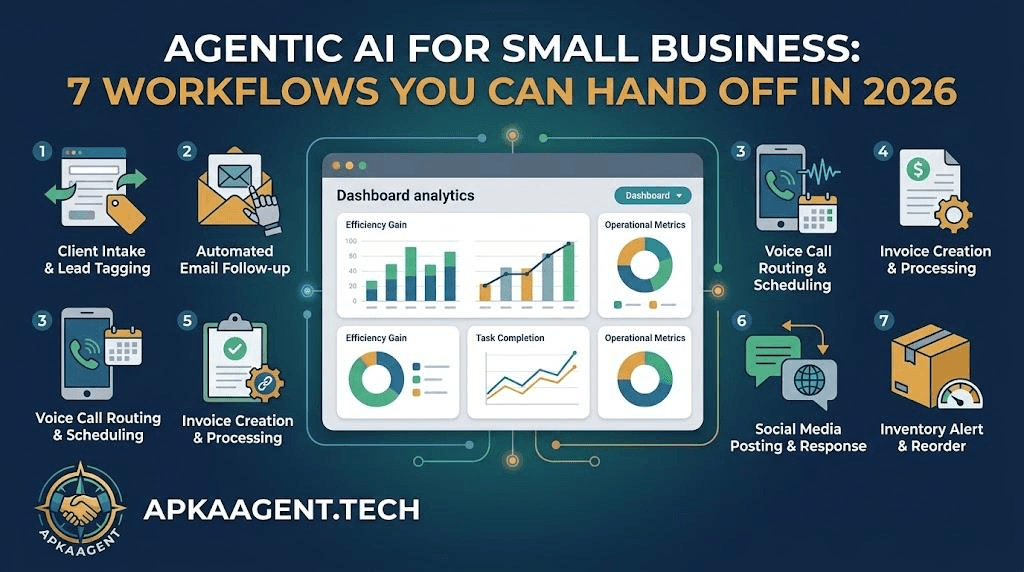
The best first workflows are ones that happen often, follow a recognizable pattern, and cost you time or money when they are late. These seven fit that description for most US small businesses.
An agent reads every new form fill, email or chat, asks the right follow-up questions, scores the lead and books a call with qualified prospects. Speed matters here, because the first business to respond usually wins the job.
Instead of a fixed five-email drip, an agent looks at what the lead did (opened, replied, visited pricing) and decides what to send next and when. Our guide on automated lead nurturing covers how to keep that follow-up from sounding robotic.
Agents can update contact records after calls, merge duplicates, tag leads by service and flag deals that have gone quiet. See what to automate first in our post on CRM AI automation.
An agent checks overdue invoices, sends polite reminders in your tone, answers simple billing questions and escalates accounts that need a phone call from you.
Across phone, text and email, an agent finds open slots, books the appointment, sends reminders and handles reschedules without anyone touching the calendar.
An agent answers common questions from your help content, gathers details on bigger issues, and routes the ticket to the right person with a summary already written.
Every Monday, an agent pulls numbers from your CRM, ads account and booking system, writes a short plain-English summary, and sends it to you. No more logging into five dashboards.
A multi-agent system is a setup where several specialized AI agents each handle one part of a process and pass work between them. For example, one agent qualifies leads, another books meetings and a third updates the CRM. It is easier to test and fix than one giant agent doing everything.
Most small businesses don't need this on day one. Start with one agent, prove it works, then add the next.
The safest way to start is to pick one workflow, define what the agent may and may not do, keep a human approval step at first, and measure results for 30 days before expanding.
For a broader view of costs and use cases by business type, read AI agents for small business. And if you're still deciding whether automation is worth it at all, our post on what AI automation actually changes in a business is a good starting point.
Yes, when it has clear limits. Restrict what the agent can do without approval, log its actions, and keep a human reviewing sensitive steps like refunds or contract changes.
Simple agents can be set up with no-code tools. Agents that connect to your CRM, phone system and internal data usually need a developer or an AI automation agency to build and maintain them properly.
An AI agent is a single system that acts on your behalf. Agentic AI is the broader approach of building AI that plans and takes action, which can include one agent or several working together.
Most businesses see measurable changes, like faster lead response, within the first month of a focused workflow going live.
Ready to hand off your first workflow? See examples in our projects or book a call with ApkaAgent to map which workflow should go first.
We help you pick the right first workflow, set the boundaries, and build an agent you can trust to run it. Let's talk.
Talk to Us